featured
/Claims Adjuster
/Restoration

As a restoration contractor, you already know how fast a project can go sideways when communication gets muddied. For years, folks have tossed around the terms “scope” and “estimate” as if they’re interchangeable. But if you’ve ever landed in a billing dispute or spent hours reworking a bid after a walk-through, you’ve seen firsthand that a scope and an estimate aren’t the same thing. Getting clear on the difference is more than splitting hairs — it’s how restoration businesses like yours keep jobs efficient, reduce rework, and make sure everyone gets paid on time.
The Short Answer to “What’s the Difference?”
A scope of work defines what’s going to be done.
An estimate defines how much it’ll cost.
That’s about as basic as it gets. So, let’s dive a bit deeper and examine each one separately.
What Is a Scope of Work?
A scope of work is your battle plan for the job, and also serves as important claims documentation.
It spells out, in no uncertain terms, exactly what’s going to be addressed — not how much it’ll cost or who’s paying, just what’s being done. Think of it as the “what,” broken down in enough detail that your crew, your client, and your estimator can all see the scene the same way.
For example, if you’re restoring a water-damaged room in a home, your scope might spell out necessary steps (i.e., line items) like this: “Remove furniture from master bedroom. Detach baseboards and set those aside to dry. Remove and dispose of lower 2 ft. of wet drywall around entire master bedroom. Set up and monitor drying equipment. Test different points around room to ensure drying is complete. Install new drywall around room to replace torn-out drywall. Apply 2 coats of paint on walls. Clean and disinfect flooring. Reset baseboards. Set furniture back in place.”
A strong scope will also list all specific materials that are needed to complete the job. For example: 1 dehumidifier + 1 air mover, 14 drywall panels, 3 gal. drywall mud, 4 gal. eggshell paint, etc.
Essentially, you’re capturing every task and material needed, tied to a specific affected area, without jumping ahead to the dollar figures. By spelling out the job this way — especially with sketches, photos, and notes supporting your recommended scope of work — you leave little to interpretation. When the homeowner, adjuster, or estimator reviews the plan, nobody’s left guessing about what’s included.
What Is an Estimate?
An estimate is a document that turns your scope into numbers.
It’s your plan translated into dollars and cents.
That involves taking each item from the scope and assigning labor hours, materials costs, and, often, pricelist codes like those found in Xactimate software. The end result is a line-by-line breakdown of what it will cost to get the work done. In other words, every task, material, or piece of equipment identified in your scope gets a corresponding spot on the estimate. That’s why the estimate can’t be developed until the scope is nailed down.
If you ever find yourself needing a revised estimate for a project, chances are there was confusion or misinterpretation about scope details. Change orders, supplemental bids, and arguments with adjusters almost always tie back to not having a scope adequately detailed and signed off in the first place.
LEARN MORE: How to Build Better Estimates with magicplan Pro Estimate+ To Get Paid
How Scope and Estimate Work Together
Scope and estimate are two sides of the restoration workflow. The scope maps out what’s needed; it’s the boots-on-the-ground assessment of reality. The estimate comes second, applying time, costs, and sometimes insurance coding to each item in that plan.
When it’s done right, the process looks like this:
- Walk the job, building the scope room by room, with clear line items and quantities.
- Document what you find with sketches, photos and descriptions tied to specific areas.
- Export the scope data.
- Have your estimator build an estimate from your scope, applying pricing and codes.
The tighter and more detailed your scope, the faster your estimate gets done — and the less likely you’ll hit snags later. That’s a huge time-saver, especially with today’s scoping technology.
Why Clarity in Scope Makes Estimating Easier — and Gets Your Company Paid Faster
Field experience tells the story: poor or vague scoping leads to endless back-and-forth during the estimating and approval process. But when a scope is built right — with accurate line items, photos, measurements, quantities, and other details — the estimator isn’t guessing what’s covered. The client or adjuster gets a clear rundown of what’s included, and there is less room for disputes.
Here’s where a digital tool really shines.
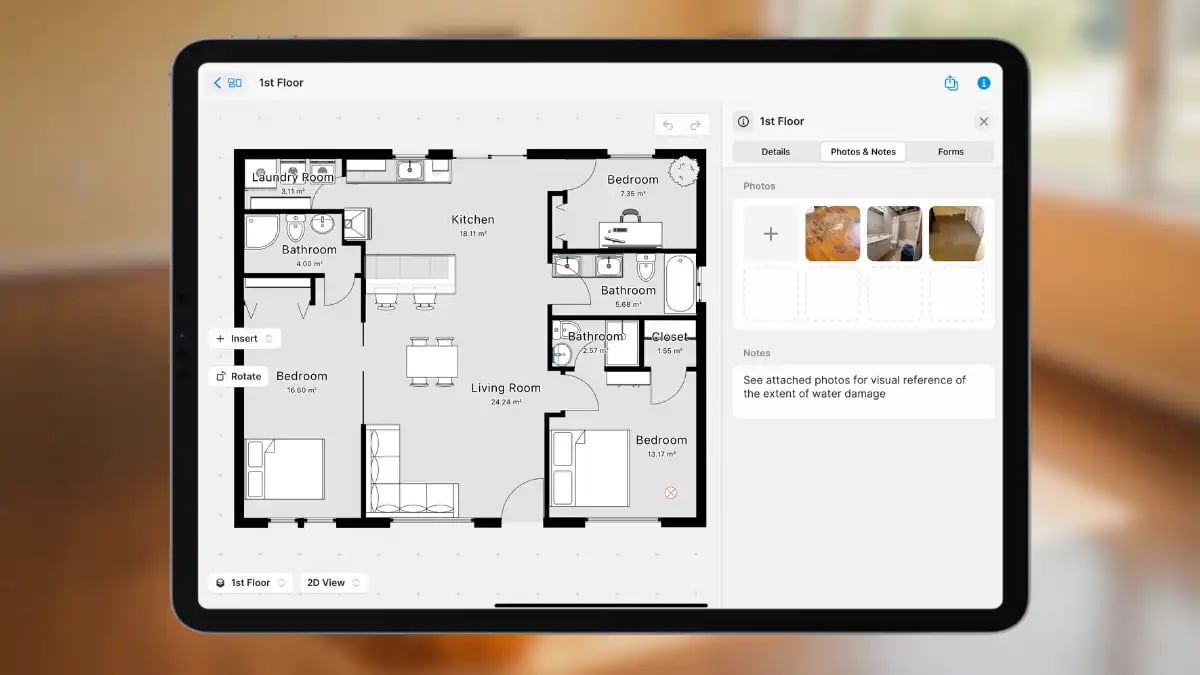
Scoping on site used to mean jotting notes on paper and snapping phone pics, then trying to organize everything back at the office. Today, sketch app software such as magicplan lets you build out that information right on your mobile device during your walk-through. With this type of software, you can easily sketch an affected space, then insert photo documentation, field data and notes instantly, cutting down on errors and eliminating wasted time spent remembering what you saw.
How Digital Scoping Streamlines the Process
Say you’re scoping a fire-damage job in a three-bedroom house. With magicplan restoration software, you move room by room, adding line items (pulled from in-app item libraries) and adding sketched, photos and quantity details into your digital scope. Using this process, you can make sure each task gets its own spot, with your helpful details and visual documentation neatly attached. It’s a great way to ensure you end up with proper documentation.
The best part? A quick transfer to your estimator.
Instead of having your estimator retype all of it into Xactimate (risking double entries and missed details), you can export a complete, Xactimate-ready ESX file to your estimator straight from the magicplan app. That file carries all of your scoping data — i.e., line items with supporting sketches, images and notes — directly to your estimator, ready for pricing and reporting. This handoff is where technology pays off: the estimator spends less time deciphering handwriting or tracking down missing information.
A real-world example: Field scoping meets fast estimating.
Picture this: you’re performing a flood job walk-through. In the old days, you would have had to scribble notes, snap some pictures, and maybe call your estimator to explain things that “should be obvious.” However, with an app such as magicplan, your process has become way more advanced: You pull out your phone, scope each room right as you see it, add critical details and photo documentation, and export your scope instantly when you’re done. No missed scope items, no confusion, no repeat work.
Coming soon: magicplan/Xactimate integration will reach a whole new level.
Soon, you’ll be able to export a project’s entire scope in the ESX format so line items in the scope transfer directly to Xactimate. That means even fewer steps between scoping and final estimate, for greater efficiency.
Wrap-Up
Making the distinction between “scope of work” and “estimate” may seem like splitting hairs. But in the real world of restoration, it’s how you build trust, cut down on wasted time, and improve your bottom line. A scope of work defines exactly what needs to be addressed. An estimate tells you (and your client, or the insurance company) what that will cost. When you bring both together, especially with a modern digital tool, jobs run more smoothly and approvals come more quickly.
Any time you sharpen your process, everybody wins: your crew, your customers, and your cash flow.
HOW TO CREATE A HELPUFL SITE-ASSESSMENT CHECKLIST
Watch this 2½-minute magicplan video to see how it’s done!

Kyle Morin
Blueprint to Faster Mitigation Estimates Guide
Learn how to master Xactimate® for mitigation estimates.


Share article