featured
/Restoration
Restoration clients care about privacy because they are letting you into the most personal space they own: their home. They want you to fully document the loss that has occurred and the work you perform, but they also want to feel respected, informed, and in control of where their information goes.
Why Privacy Is Important
Two reasons…
Homeowners Understandably Worry About It
When you first walk into a home with a loss, you are intent on inspecting and documenting the affected areas.
But the minute you pull out your camera, the homeowner will likely wonder what else is being captured in the background and who might see it later. The very thought of you documenting personal items and sensitive spaces — such as family photos, financial paperwork, medicine bottles, or a child’s bedroom in the background — can create a lot of anxiety. Many homeowners are also more aware of data breaches and social media than they used to be, and they worry about that sort of thing happening to them.
Good Privacy Practices Benefit Your Business
Visible privacy safeguards — such as explaining consent, blurring personal details, limiting what you share externally, and securely storing data — signal that you take the homeowner’s dignity seriously. That combination of transparency and professionalism builds trust, which often translates into smoother jobs, fewer complaints, and more referrals.
So, let’s look at six tips for optimizing your privacy procedures.
1. Develop Trust Before You Hit “Record”
You can set the tone for privacy before starting your first walkthrough. If a homeowner is first alerted to the need for photos and videos when you silently lift your phone, you have already lost ground. Clear, calm explanation upfront turns documentation from something “done to them” into something you are “doing with them.” Therefore, take time to explain the reasons why you need visual documentation: for insurance claim purposes, quality control, and protection of both parties in case questions come up later. When homeowners understand the “why,” they are far more comfortable with the “how.”
Also, before you begin scoping the job, talk in plain language about what exactly you will document (damaged areas, equipment setup, work in progress, final results) and what you will avoid (unrelated rooms or personal items when possible). Clear communication is the key to minimizing client anxiety.
2. Get Consent Without Making It Awkward
Formal consent might sound intimidating, but you can weave it naturally into your intake process. A simple written and signed acknowledgment — stating that the homeowner understands that photos, videos, and digital forms and reports will be used for documentation — can go a long way toward easing concerns. It also gives you something to reference if there is confusion later.
Digital consent tools make this step easy to do in the field. For example, magicplan restoration software lets you collect digital a homeowner’s signature directly in custom forms inside the app, so you can capture agreement on how visual documentation will be used inside their home. The app even ties the homeowner’s signature to that specific project, so there is a clear record that the homeowner agreed to photo documentation, video documentation and digital forms and reports as part of the job file. 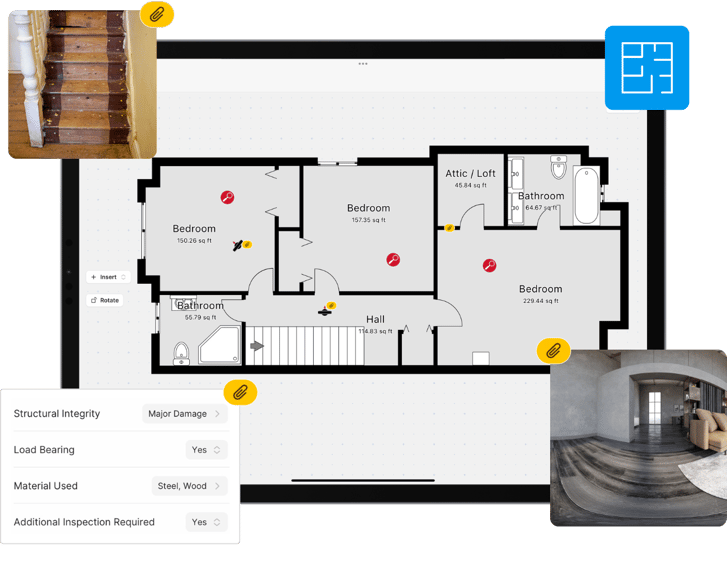
3. Document Only What Pertains to the Job
The process of documenting a loss against an insurance policy must meet certain requirements:
From a restoration and insurance standpoint, you need enough photos and videos to tell a complete, defensible story: pre-mitigation conditions, affected materials, equipment placement, progress, and post-mitigation results. From the homeowner’s standpoint, indiscriminate filming of every corner of the house can feel unnecessary and invasive.
The balance comes from being intentional. When you’re collecting photos and videos, focus your camera on the damaged areas, the work being performed, and anything that might impact scope, pricing, or future questions from adjusters.
4. Purposely Avoid Documenting Sensitive Items
Because you operate in real homes, your software needs to account for real-life sensitivity. For instance, magicplan has a handy “video capture toggle,” This feature allows you to easily switch between taking photos and recording videos during walkthroughs, so you can choose exactly when to turn video on and off. That makes it easier to record only the segments that truly matter — like a narrated tour of just the damage — rather than letting the camera roll as you move through personal spaces.
And what if some personal details end up appearing in your photos? No problem. Edit those photos on the spot by simply redacting (hiding) those details with the software’s built-in photo tools.
SOLUTION: How to Add Photos & Annotations to your Floor Plans
5. Control What Gets Shared, And With Whom
Homeowners are often less worried about what you capture than where it goes afterward. They want to know: Is this going straight to social media? Will every photo be sent to the insurance carrier? Who has access to the videos?
That’s why it helps to use software that lets you choose which videos or photos are shared with adjusters or clients. For example, magicplan allow you to configure export settings, so you can include the proper documentation that is necessary for the claim while keeping more sensitive or internal-only media in the project file. That selective sharing aligns closely with what homeowners say they want: necessary claims documentation without unnecessary circulation of their personal space.
6. Keep Project Data Secure
A big unspoken worry for restoration clients is that images of their home will end up scattered across techs’ phones, email threads, or unsecured shared drives. Centralizing and encrypting documentation is one of the most powerful ways to reassure them that this will not happen.
That’s yet another reason why digital software is an essential tool for contractors. Within the magicplan app, for instance, each project’s data (including floor plans, photos, videos, and signatures) is tied directly to that project, stored within the app, and continuously encrypted.
Above All, Always Remember Why Privacy Matters
You operate in a business where documentation can make or break a claim, but you also work in spaces that are deeply personal. Treating data privacy as part of the customer experience, not just a legal checkbox, helps you stand out as a trustworthy, customer-focused restoration provider. When you pair clear communication and consent with restoration contractor software like magicplan, you can protect both your clients and your company without sacrificing accuracy.
READ MORE:
Learn How to Scope a Water-Damaged Site in Just 30 minutes!

Bernd Wolfram
Head of Product
Restoration Payday
Get the ultimate guide for restoration contractors to speed up payments and optimize cashflow!

Share article